 JevCode
줄별 검색
GitHub의 이용약관에 대한 의미론적 검색을 구축합니다. 단일 요청에서 Choice 질문을 사용하여 평이한 언어의 쿼리에 대해 218개의 라인 ID를 점수화하고, Noul 질문을 사용하여 해당 문서에 답변이 포함되어 있는지 확인합니다.
이 문서는 en에서 기계 번역되었으며 교정되지 않았습니다. 빠른 참고용으로만 사용하세요.

GitHub의 이용약관과 이에 대한 평이한 언어의 질문이 있습니다. 질문에 답하는 줄과 문서에 답이 없을 때 이를 감지하는 방법이 필요합니다. 포함된 쿼리는 직접적인 답이 있는 줄을 우선으로 순위 매깁니다. exists 임계값은 나머지 경우를 누락 또는 부분적으로 분류합니다. 최종적으로 find()을 얻게 되며, 이는 각 줄에 대한 exists 확률과 관련성 점수를 반환합니다.
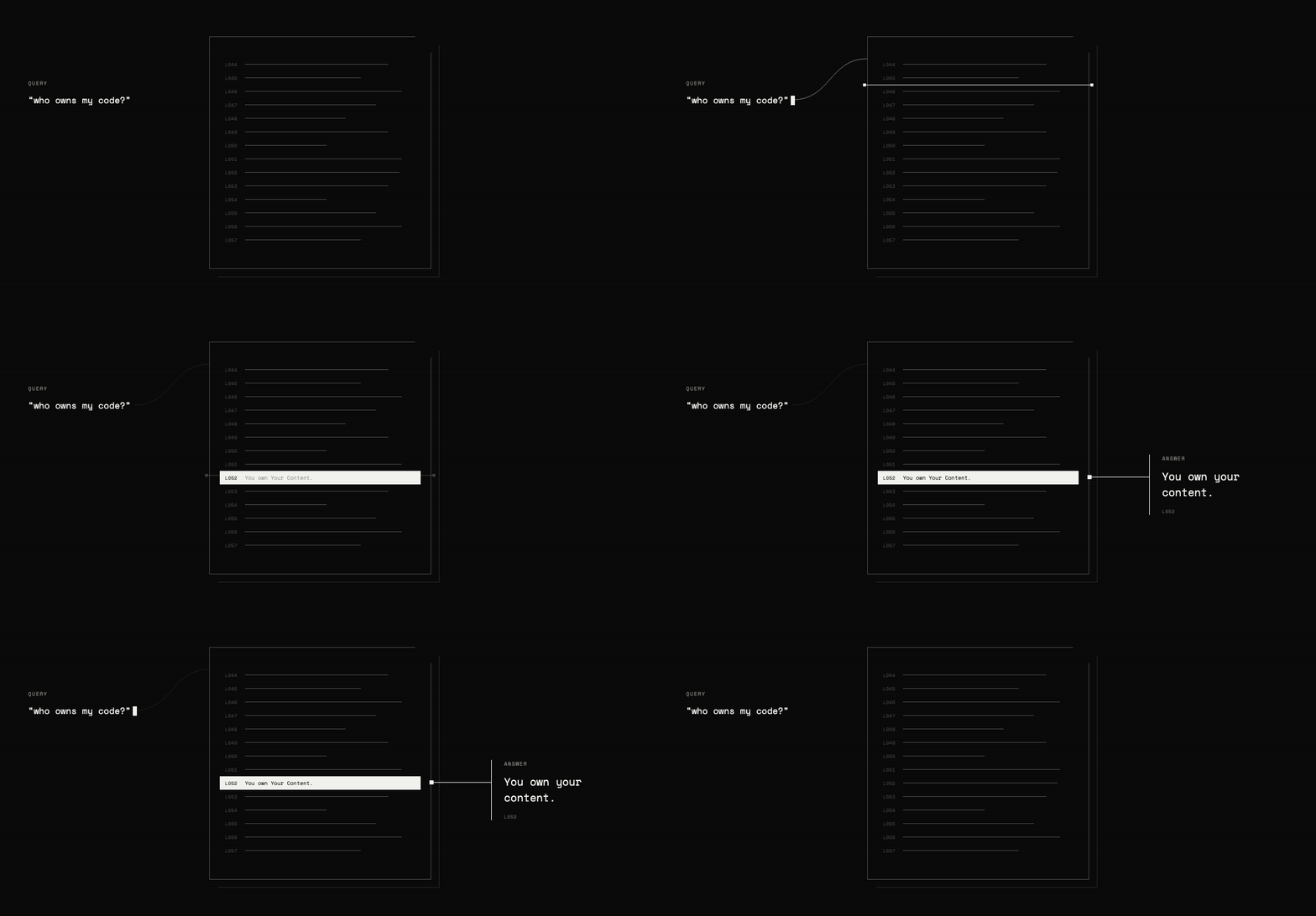
검색 백엔드는 세 부분으로 구성됩니다:
- TypeSafe가 각 줄을 가리킬 수 있도록 줄마다 ID를 붙입니다.
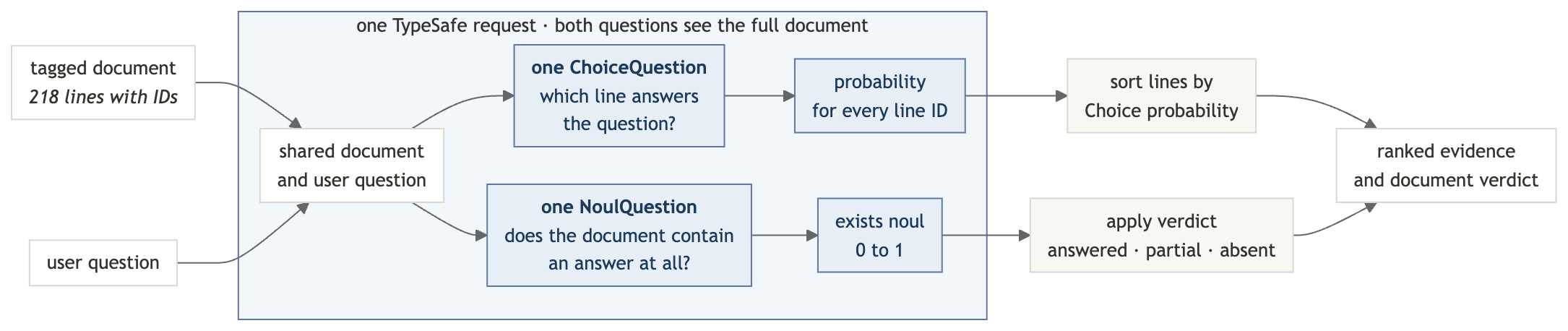
Choice질문을 사용하여, 그 줄 ID들을 쿼리에 얼마나 잘 답하는지에 따라 순위를 매깁니다. Choice 질문의 확률은 항상 1로 합산되므로, 쿼리에 답하는 줄이 없더라도 한 줄이 1위를 차지합니다.- 동일한 요청에서
Noul질문을 사용하여 문서에 답이 포함되어 있는지 확인합니다.
설정
TypeSafe API 키 받기
TypeSafe 콘솔에서 키를 생성하고 내보내기:
export TYPESAFE_API_KEY="your-key-here"의존성 설치
pip install "typesafe-sdk>=0.5.7" cooksafe \
  --extra-index-url https://pypi.typesafe.ai/
JsonCache 포함된 API 응답을 재생하므로, 아래 단계는 API 키나 비용 없이 실행됩니다
실제 요청을 수행하려면 TYPESAFE_API_KEY을 설정하고 json_cache.json을 삭제하세요.
스크립트 생성
semantic_search.py에서 import와 클라이언트를 시작하세요:
import os
import urllib.request
from pathlib import Path

from cooksafe import JsonCache
from typesafe_sdk import Choice, Noul, NoulCriteria, TypeSafeClient

TYPESAFE_MODEL = "jev-1.12"

client = TypeSafeClient(
    api_key=os.environ.get("TYPESAFE_API_KEY", "cache-only"), timeout=120.0
)
json_cache = JsonCache(Path("json_cache.json"))
1단계: 각 줄에 ID를 태그하기
테스트 문서는 GitHub의 서비스 약관이며, 218개의 조항으로 구성되어 있으므로 모든 검색 결과는 인용 가능한 한 줄의 텍스트를 가리킵니다.
semantic_search.py에 추가:
GIST = (
    "https://gist.githubusercontent.com/eugene-shvarts/900632789a24983d5678ffd508dd01f6"
    "/raw/cf9c2ab422d568deade949ef0a06bed6896964b9/github-tos.txt"
)


@json_cache
def fetch_document(url: str) -> str:
    request = urllib.request.Request(
        url, headers={"User-Agent": "typesafe-cookbook/1.0"}
    )
    with urllib.request.urlopen(request) as response:
        return response.read().decode()


LINES = fetch_document(GIST).splitlines()
캐시는 반복적인 다운로드를 방지하며, splitlines()은 218개의 문자열 목록을 남깁니다.
이제 각 줄 앞에 짧은 ID를 붙이고, 줄들을 다시 하나의 문서로 연결하세요. 모델은 이 ID를 사용하여 자신의 답변을 가리킵니다.
def line_id(i: int) -> str:
    return f"L{i:03d}"


DOCUMENT = "\n".join(f"{line_id(i)}| {line}" for i, line in enumerate(LINES))
DOCUMENT 이제 다음과 같이 보입니다:
L052| You own Your Content. If you post Content you did not create, you are responsible for...
L053| You grant us and other Users the licenses in Sections D.4–D.8. These licenses apply...
L054| 4. License Grant to Us
2단계: 정답이 어디에 있는지 물어보기
A Choice 질문은 각 옵션에 대해 확률을 반환합니다. 줄 ID를 옵션으로 사용하고, “옵션을 선택하세요”는 “줄을 가리키세요”가 됩니다.
def where_question(query: str) -> Choice:
    return Choice(
        instructions=f'Which line of the document contains the answer to: "{query}"?',
        criteria={line_id(i): None for i in range(len(LINES))},
    )
옵션 설명은 None입니다. 문서에는 각 ID에 해당하는 텍스트가 이미 포함되어 있기 때문입니다. 쿼리는 instructions에 입력되며, 검색 간 상태는 변경되지 않습니다.
참고 —
Choice질문은 최대 255개의 옵션을 허용하므로, 이 레시피는 한 번의 요청으로 최대 255줄의 문서를 검색합니다. 이를 초과할 경우 두 번의 단계로 검색합니다: 첫 번째 Choice 질문은 줄의 범위를 선택하고, 두 번째 단계는 해당 범위 내의 줄을 순위 매깁니다.
3단계: 답변이 존재하는지 확인
Choice 확률은 항상 1로 합산되므로, 문서가 질문에 답하지 않더라도 일부 줄이 1위를 차지합니다. 순위만으로는 실제 답변과 가장 근접한 무관한 줄을 구분할 수 없습니다.
두 번째 질문을 같은 요청으로 던져보세요:
def exists_question(query: str) -> Noul:
    return Noul(
        instructions=f'Does any line of the document address or answer: "{query}"?',
        criteria=NoulCriteria(
            true="At least one line of the document states or directly implies the answer",
            false="No line of the document addresses this",
        ),
    )
Choice 확률과 달리 Noul 확률은 다른 옵션에 의존하지 않으므로, 문서에 답변이 없을 경우 거의 0에 가까워질 수 있습니다.
4단계: 두 질문을 하나의 요청으로 보내기
system_one 메서드는 두 질문 모두 한 번의 패스로 해결합니다. 상태가 한 번만 전송되므로, 존재 여부 확인을 추가하려면 약간의 추가 출력만 필요합니다.
@json_cache
def _find(
    model: str,
    state: str,
    where: Choice,
    exists: Noul,
) -> dict:
    response = client.system_one(
        state=state,
        questions={"where": where, "exists": exists},
        model=model,
    )
    probabilities = response.answers["where"].probabilities
    return {
        "exists": response.answers["exists"].noul,
        "relevance": [probabilities.get(line_id(i), 0.0) for i in range(len(LINES))],
    }


def find(query: str) -> dict:
    return _find(
        TYPESAFE_MODEL,
        DOCUMENT,
        where_question(query),
        exists_question(query),
    )
relevance 목록은 문서 순서대로 각 줄에 하나의 점수를 유지합니다.
단계 5: 결과 읽기
두 가지 로컬 코드가 작업을 마무리합니다: verdict()는 원시 exists 확률을 세 가지 상태로 변환하며, 부분 정답을 위한 중간 상태도 포함됩니다. show()는 relevance를 막대 차트로 렌더링하여 터미널에서 순위를 쉽게 읽을 수 있게 합니다.
FOUND, ABSENT = 0.7, 0.35  # present answers typically read >=0.9, absent <=0.05


def verdict(exists: float) -> str:
    if exists >= FOUND:
        return "answered in this document"
    return "not in this document" if exists < ABSENT else "partially addressed"


def show(query: str, top: int = 4) -> dict:
    result = find(query)
    print(f'"{query}"')
    print(f"  exists {result['exists']:.2f} -> {verdict(result['exists'])}")
    ranked = sorted(
        range(len(LINES)), key=lambda i: result["relevance"][i], reverse=True
    )
    for i in ranked[:top]:
        bar = "#" * max(1, round(result["relevance"][i] * 12))
        preview = LINES[i][:58].rstrip()
        print(f"  {line_id(i)}  {result['relevance'][i]:.2f}  {bar:<12}  {preview}")
    return result
아래의 예제를 구분하는 임계값이지만, 프로덕션에서 사용하기 전에 자체 문서에 맞춰 조정하세요.
6단계: 검색 실행
직접적인 답변이 있는 질문 두 개, 답변이 없는 질문 한 개, 그리고 부분적인 답변이 있는 질문 한 개를 포함해 총 네 개의 질문을 하세요.
print(f"{len(LINES)} lines, {len(DOCUMENT):,} characters\n")
show("who owns the code I upload?")
print()
show("can GitHub kick me off the platform without warning?")
print()
show("do I have to take disputes to arbitration?", top=2)
print()
show("can minors use GitHub with parental permission?", top=2)
218 lines, 43,980 characters
"who owns the code I upload?"
exists 0.98 -> answered in this document
L052 0.95 ########### You own Your Content. If you post Content you did not crea
L046 0.02 # Short version: You own content you create, but you allow u
L051 0.02 # 3. Ownership and License Grants
L217 0.01 # Questions about the Terms of Service? Contact us through t
"can GitHub kick me off the platform without warning?"
exists 0.97 -> answered in this document
L168 0.97 ############ GitHub has the right to suspend or terminate your access t
L167 0.03 # 3. GitHub May Terminate
L000 0.00 # Effective date: April 27, 2026 · A. Definitions
L001 0.00 # Short version: We use these basic terms throughout the agr
"do I have to take disputes to arbitration?"
exists 0.14 -> not in this document
L205 0.86 ########## Except to the extent applicable law provides otherwise, th
L168 0.02 # GitHub has the right to suspend or terminate your access t
"can minors use GitHub with parental permission?"
exists 0.46 -> partially addressed
L029 0.90 ########### You must be age 13 or older. While we are thrilled to see
L012 0.07 # “User,” “You,” and “Your” refer to the individual person,점수가 의미하는 바
첫 번째 두 쿼리는 직접적인 답변과 이를 검증하기 위한 소스 행을 반환합니다。
나머지 두 가지는 존재 확인이 왜 중요한지를 보여줍니다:
- 중재: 랭킹은 가장 가까운 줄에 0.86점을 부여하지만,
exists는 0.14에 불과하다. 답변은 문서에 없다. - 부모 동의: 연령 규정이 1위를 차지하지만, 부모 동의가 규정을 변경하는지 여부는 답변하지 않는다. 결과는 부분적으로 다뤄짐.
랭킹은 어디를 봐야 하는지 알려주고, exists 점수는 결과가 질문을 답변하는지 알려줍니다.
자신의 문서에서 사용해 보세요
TypeSafe 플레이그라운드에서 태그된 계약서 열기하여 동일한 텍스트에 대한 질문을 수정하세요. 사용자 고유의 데이터를 검색하려면 fetch_document()의 URL을 교체하세요; 스크립트의 나머지 모든 줄은 LINES을 기준으로 작동합니다.