 JevCode
逐行搜索
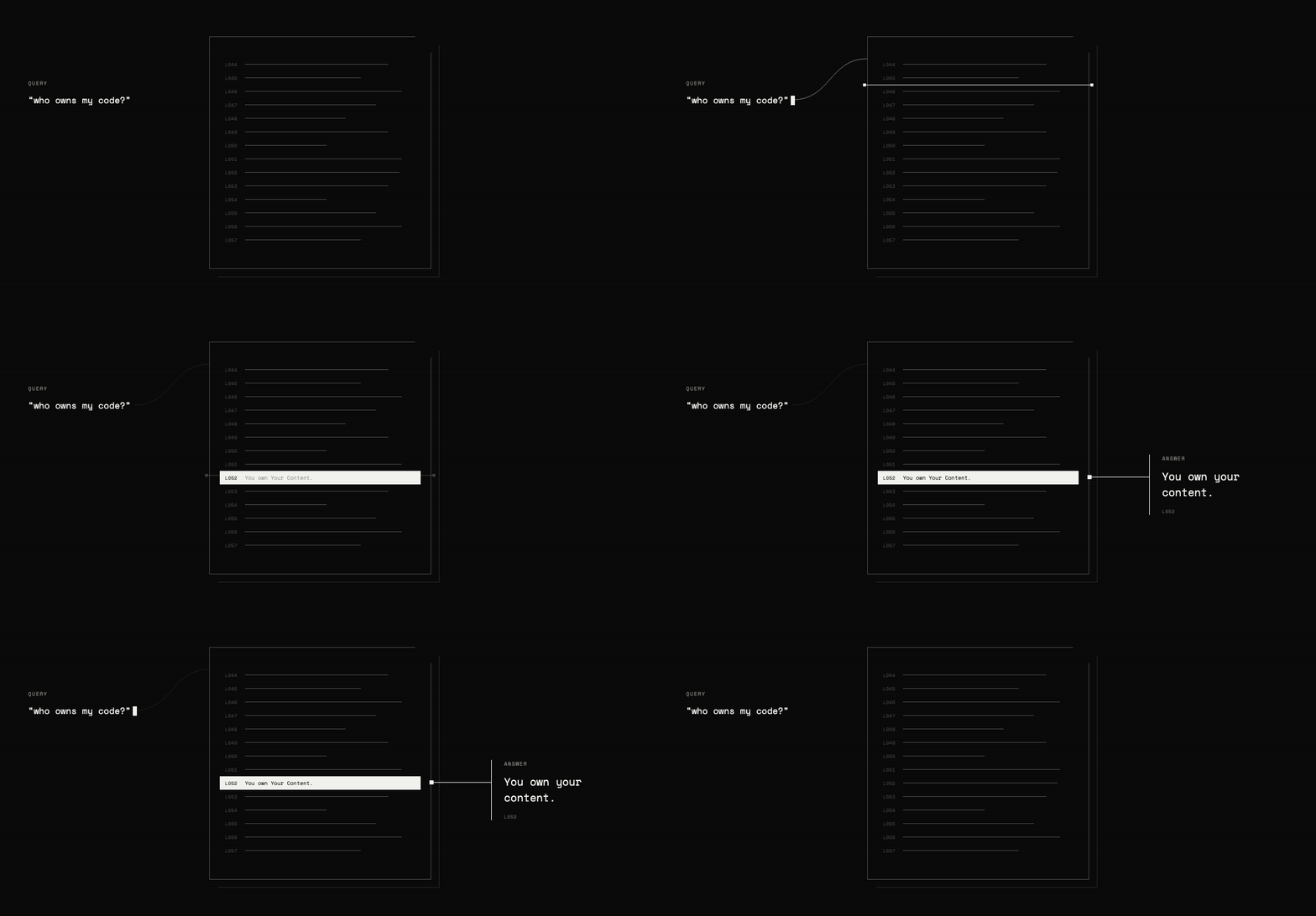
为 GitHub 的服务条款构建语义搜索。在一次请求中,使用 Choice 问题对 218 个行 ID 进行评分,并使用 Noul 问题检查文档是否包含答案。
本文由机器翻译自 en,未经人工校对,仅供快速参考。

你拥有 GitHub 的服务条款以及一个关于该条款的通俗语言问题。你需要找到能够回答该问题的行,并确定一种方法来检测文档中是否没有答案。包含的查询会将直接回答问题的行排在前面。exists 阈值将剩余情况分类为缺失或部分缺失。最终得到 find(),它返回每行的 exists 概率和相关性得分。
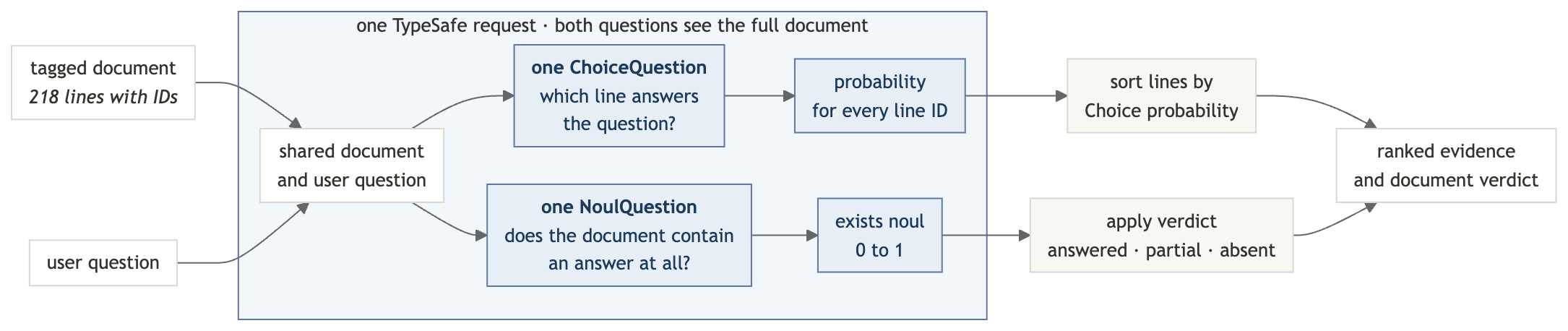
搜索后端由三个部分组成:
- 为每一行添加 ID,以便 TypeSafe 能够指向它。
- 使用
Choice问题根据这些行 ID 回答查询的程度对其进行排名。Choice 问题的概率总和始终为 1,因此即使没有任何行回答查询,某一行也会排在第一位。 - 在同一请求中,使用
Noul问题检查文档是否包含任何答案。
设置
获取 TypeSafe API 密钥
在 TypeSafe 控制台中创建一个密钥并导出它:
export TYPESAFE_API_KEY="your-key-here"安装依赖项
pip install "typesafe-sdk>=0.5.7" cooksafe \
  --extra-index-url https://pypi.typesafe.ai/
JsonCache 会重放包含的 API 响应,因此以下步骤无需 API 密钥或任何费用即可运行。若要使请求变为实时请求,请设置 TYPESAFE_API_KEY 并删除 json_cache.json。
创建脚本
通过导入和客户端启动 semantic_search.py:
import os
import urllib.request
from pathlib import Path

from cooksafe import JsonCache
from typesafe_sdk import Choice, Noul, NoulCriteria, TypeSafeClient

TYPESAFE_MODEL = "jev-1.12"

client = TypeSafeClient(
    api_key=os.environ.get("TYPESAFE_API_KEY", "cache-only"), timeout=120.0
)
json_cache = JsonCache(Path("json_cache.json"))
步骤 1:为每一行添加 ID
测试文档是 GitHub 的服务条款,被拆分为 218 个子条款,因此每个搜索结果都指向一条可引用的行。
添加到 semantic_search.py:
GIST = (
    "https://gist.githubusercontent.com/eugene-shvarts/900632789a24983d5678ffd508dd01f6"
    "/raw/cf9c2ab422d568deade949ef0a06bed6896964b9/github-tos.txt"
)


@json_cache
def fetch_document(url: str) -> str:
    request = urllib.request.Request(
        url, headers={"User-Agent": "typesafe-cookbook/1.0"}
    )
    with urllib.request.urlopen(request) as response:
        return response.read().decode()


LINES = fetch_document(GIST).splitlines()
缓存可防止重复下载,而 splitlines() 会生成一个包含 218 个字符串的列表。
现在,为每一行添加一个简短的 ID 前缀,并将这些行重新拼接为一个文档。模型会使用这些 ID 来指向其答案。
def line_id(i: int) -> str:
    return f"L{i:03d}"


DOCUMENT = "\n".join(f"{line_id(i)}| {line}" for i, line in enumerate(LINES))
DOCUMENT 现在看起来像这样:
L052| You own Your Content. If you post Content you did not create, you are responsible for...
L053| You grant us and other Users the licenses in Sections D.4–D.8. These licenses apply...
L054| 4. License Grant to Us
步骤 2:询问答案的位置
Choice 问题会为每个选项返回一个概率。使用行 ID 作为选项,
“选择一个选项” 就变成了 “指向一行”。
def where_question(query: str) -> Choice:
    return Choice(
        instructions=f'Which line of the document contains the answer to: "{query}"?',
        criteria={line_id(i): None for i in range(len(LINES))},
    )
选项描述为 None,因为文档中已包含每个 ID 对应的文本。查询内容置于 instructions 中;在搜索之间,状态保持不变。
说明 —
Choice问题最多接受 255 个选项,因此本配方在一次请求中最多搜索 255 行的文档。超过此限制时,需分两次搜索:第一个Choice问题选择一个行窗口,第二个问题对该窗口内的行进行排名。
步骤 3:检查是否存在答案
Choice 概率之和始终为 1,因此即使文档未回答问题,某一行仍会排名第一。仅凭排名无法区分真实答案与最接近的不相关行。
因此,在同一请求中提出第二个问题:
def exists_question(query: str) -> Noul:
    return Noul(
        instructions=f'Does any line of the document address or answer: "{query}"?',
        criteria=NoulCriteria(
            true="At least one line of the document states or directly implies the answer",
            false="No line of the document addresses this",
        ),
    )
与 Choice 的概率不同,Noul 的概率不依赖于其他选项,因此当文档没有答案时,它可能接近于零。
步骤 4:在单个请求中发送两个问题
system_one 方法在一次传递中回答两个问题。状态只发送一次,因此添加存在性检查只需要少量的额外输出。
@json_cache
def _find(
    model: str,
    state: str,
    where: Choice,
    exists: Noul,
) -> dict:
    response = client.system_one(
        state=state,
        questions={"where": where, "exists": exists},
        model=model,
    )
    probabilities = response.answers["where"].probabilities
    return {
        "exists": response.answers["exists"].noul,
        "relevance": [probabilities.get(line_id(i), 0.0) for i in range(len(LINES))],
    }


def find(query: str) -> dict:
    return _find(
        TYPESAFE_MODEL,
        DOCUMENT,
        where_question(query),
        exists_question(query),
    )
relevance 列表按文档顺序逐行保留一个分数。
步骤 5:读取结果
两段本地代码完成这项工作:verdict() 将原始的 exists 概率转换为三种状态,其中一种用于表示部分答案;show() 将 relevance 渲染为条形图,以便在终端中清晰查看排名。
FOUND, ABSENT = 0.7, 0.35  # present answers typically read >=0.9, absent <=0.05


def verdict(exists: float) -> str:
    if exists >= FOUND:
        return "answered in this document"
    return "not in this document" if exists < ABSENT else "partially addressed"


def show(query: str, top: int = 4) -> dict:
    result = find(query)
    print(f'"{query}"')
    print(f"  exists {result['exists']:.2f} -> {verdict(result['exists'])}")
    ranked = sorted(
        range(len(LINES)), key=lambda i: result["relevance"][i], reverse=True
    )
    for i in ranked[:top]:
        bar = "#" * max(1, round(result["relevance"][i] * 12))
        preview = LINES[i][:58].rstrip()
        print(f"  {line_id(i)}  {result['relevance'][i]:.2f}  {bar:<12}  {preview}")
    return result
这些阈值用于分隔以下示例,但在生产环境中使用前,请根据你的文档对其进行调优。
第 6 步:运行搜索
提出四个问题:两个有直接答案的问题,一个没有答案的问题,以及一个有部分答案的问题。
print(f"{len(LINES)} lines, {len(DOCUMENT):,} characters\n")
show("who owns the code I upload?")
print()
show("can GitHub kick me off the platform without warning?")
print()
show("do I have to take disputes to arbitration?", top=2)
print()
show("can minors use GitHub with parental permission?", top=2)
218 lines, 43,980 characters
"who owns the code I upload?"
exists 0.98 -> answered in this document
L052 0.95 ########### You own Your Content. If you post Content you did not crea
L046 0.02 # Short version: You own content you create, but you allow u
L051 0.02 # 3. Ownership and License Grants
L217 0.01 # Questions about the Terms of Service? Contact us through t
"can GitHub kick me off the platform without warning?"
exists 0.97 -> answered in this document
L168 0.97 ############ GitHub has the right to suspend or terminate your access t
L167 0.03 # 3. GitHub May Terminate
L000 0.00 # Effective date: April 27, 2026 · A. Definitions
L001 0.00 # Short version: We use these basic terms throughout the agr
"do I have to take disputes to arbitration?"
exists 0.14 -> not in this document
L205 0.86 ########## Except to the extent applicable law provides otherwise, th
L168 0.02 # GitHub has the right to suspend or terminate your access t
"can minors use GitHub with parental permission?"
exists 0.46 -> partially addressed
L029 0.90 ########### You must be age 13 or older. While we are thrilled to see
L012 0.07 # “User,” “You,” and “Your” refer to the individual person,分数含义
前两个查询返回直接答案以及用于验证这些答案的源行。
后两个查询展示了存在性检查的重要性:
- 仲裁: 排名将最接近的行评分为 0.86,但
exists仅为 0.14。答案不在文档中。 - 父母许可: 年龄规则排名第一,但它并未回答父母许可是否会改变该规则。结果是部分解决。
排名告诉你去哪里查找;exists 分数告诉你结果是否回答了问题。
在你的文档上尝试
在 TypeSafe 游乐场中打开带标签的合同,以便针对相同文本编辑问题。要搜索你自己的文档,请替换 fetch_document() 中的 URL;脚本的每一行都基于 LINES 工作。