 JevCode
Line-by-line search
Build semantic search for GitHub's Terms of Service. In one request, score 218 line ids against a plain-language query with a Choice question, and use a Noul question to check whether the document contains an answer.

You have GitHub’s Terms of Service and a plain-language question about it. You need the
lines that answer the question and a way to detect when the document has no answer. The
included queries rank lines with direct answers first. The exists thresholds classify
the remaining cases as missing or partial. You end up with find(), which returns the
exists probability and one relevance score per line.
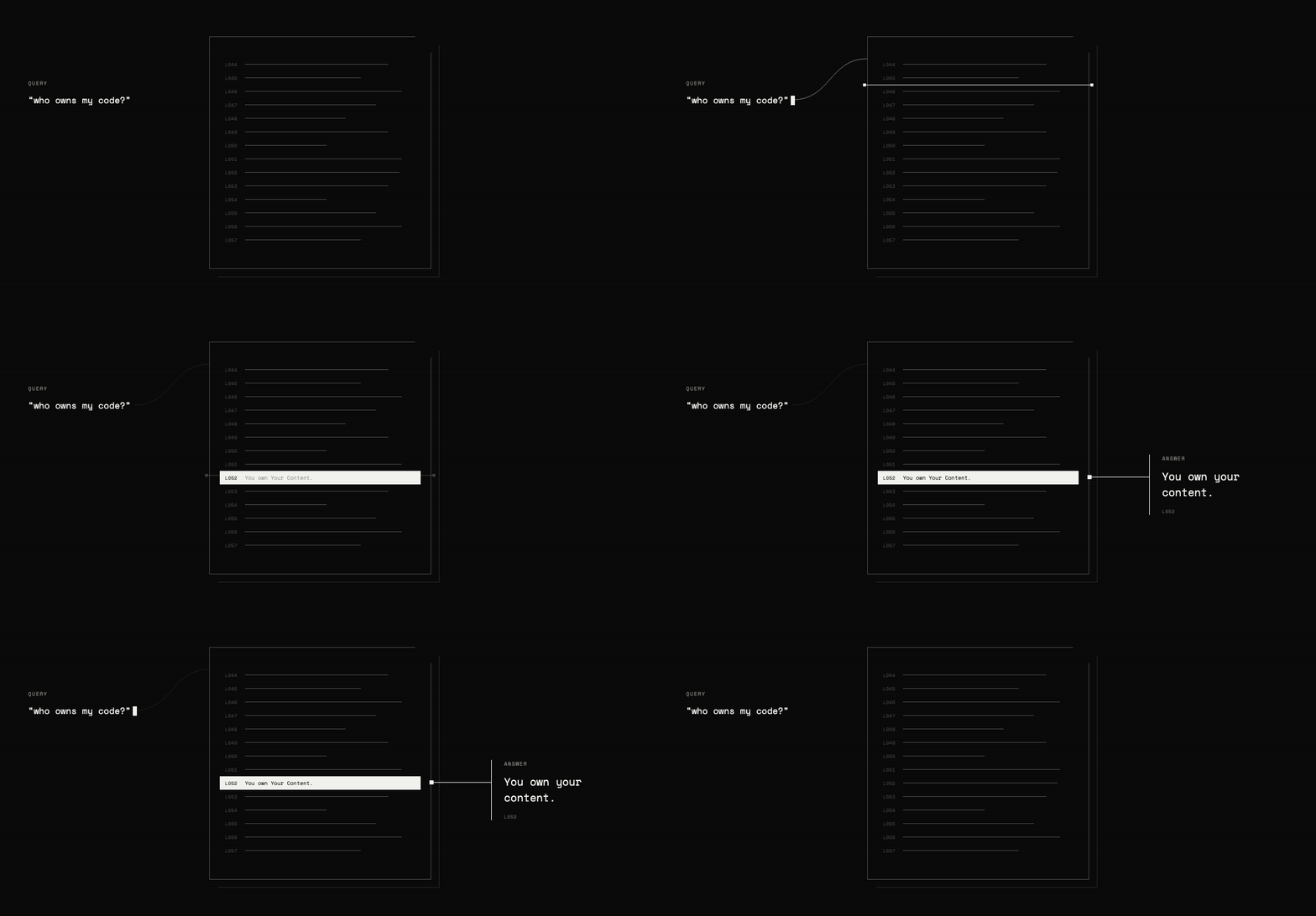
The search backend comes together in three parts:
- Tag each line with an ID so TypeSafe can point to it.
- Use a
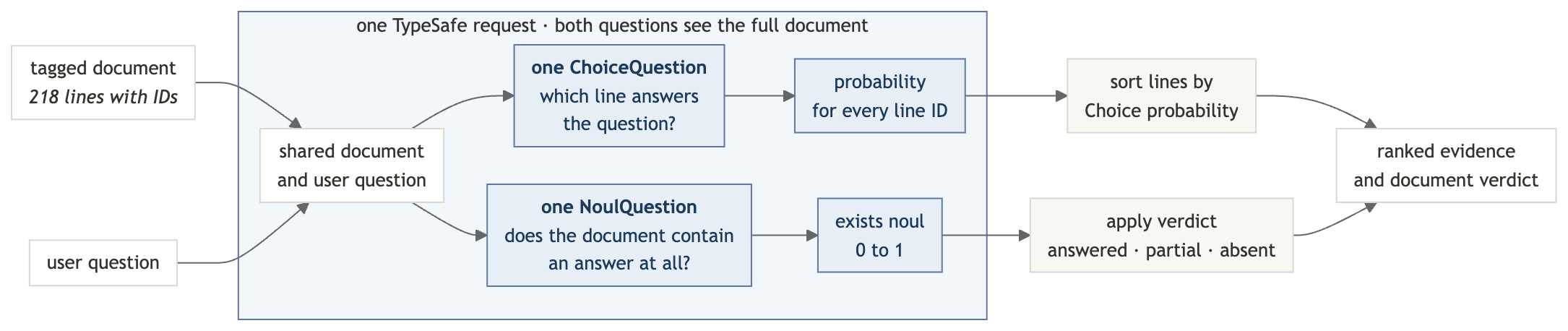
Choicequestion to rank those line IDs by how well they answer the query. Choice question probabilities always add up to 1, so a line ranks first even when none answer the query. - In the same request, use a
Noulquestion to check whether the document contains an answer at all.
Setup
Get a TypeSafe API key
Create a key in the TypeSafe console and export it:
export TYPESAFE_API_KEY="your-key-here"Install the dependencies
pip install "typesafe-sdk>=0.5.7" cooksafe \
  --extra-index-url https://pypi.typesafe.ai/
JsonCache replays the included API responses, so the steps below run without an API key
or any spend. To make the requests live instead, set TYPESAFE_API_KEY and delete
json_cache.json.
Create the script
Start semantic_search.py with the imports and the client:
import os
import urllib.request
from pathlib import Path

from cooksafe import JsonCache
from typesafe_sdk import Choice, Noul, NoulCriteria, TypeSafeClient

TYPESAFE_MODEL = "jev-1.12"

client = TypeSafeClient(
    api_key=os.environ.get("TYPESAFE_API_KEY", "cache-only"), timeout=120.0
)
json_cache = JsonCache(Path("json_cache.json"))
Step 1: tag every line with an ID
The test document is GitHub’s Terms of Service, split into 218 clauses, so every search result points to one quotable line.
Add to semantic_search.py:
GIST = (
    "https://gist.githubusercontent.com/eugene-shvarts/900632789a24983d5678ffd508dd01f6"
    "/raw/cf9c2ab422d568deade949ef0a06bed6896964b9/github-tos.txt"
)


@json_cache
def fetch_document(url: str) -> str:
    request = urllib.request.Request(
        url, headers={"User-Agent": "typesafe-cookbook/1.0"}
    )
    with urllib.request.urlopen(request) as response:
        return response.read().decode()


LINES = fetch_document(GIST).splitlines()
The cache prevents repeated downloads, and splitlines() leaves a list of 218 strings.
Now prefix each line with a short ID and join the lines back into one document. The model uses these IDs to point to its answer.
def line_id(i: int) -> str:
    return f"L{i:03d}"


DOCUMENT = "\n".join(f"{line_id(i)}| {line}" for i, line in enumerate(LINES))
DOCUMENT now looks like this:
L052| You own Your Content. If you post Content you did not create, you are responsible for...
L053| You grant us and other Users the licenses in Sections D.4–D.8. These licenses apply...
L054| 4. License Grant to Us
Step 2: ask where the answer is
A Choice question returns a probability for every option. Use the line IDs as the
options,
and “pick an option” becomes “point to a line.”
def where_question(query: str) -> Choice:
    return Choice(
        instructions=f'Which line of the document contains the answer to: "{query}"?',
        criteria={line_id(i): None for i in range(len(LINES))},
    )
The option descriptions are None because the document already contains the text for each
ID. The query goes in instructions; the state stays unchanged between searches.
Note — A
Choicequestion accepts up to 255 options, so this recipe searches documents of up to 255 lines in one request. Past that, search in two passes: one Choice question picks a window of lines, and a second ranks the lines inside it.
Step 3: check whether an answer exists
Choice probabilities always add up to 1, so some line ranks first even when the document doesn’t answer the question. The ranking alone can’t distinguish a real answer from the closest irrelevant line.
So ask a second question, in the same request:
def exists_question(query: str) -> Noul:
    return Noul(
        instructions=f'Does any line of the document address or answer: "{query}"?',
        criteria=NoulCriteria(
            true="At least one line of the document states or directly implies the answer",
            false="No line of the document addresses this",
        ),
    )
Unlike the Choice probabilities, the Noul probability doesn’t depend on the other options, so it can fall near zero when the document has no answer.
Step 4: send both questions in one request
The system_one method answers both questions in one pass. The state is sent once, so
adding the existence check requires only a small amount of extra output.
@json_cache
def _find(
    model: str,
    state: str,
    where: Choice,
    exists: Noul,
) -> dict:
    response = client.system_one(
        state=state,
        questions={"where": where, "exists": exists},
        model=model,
    )
    probabilities = response.answers["where"].probabilities
    return {
        "exists": response.answers["exists"].noul,
        "relevance": [probabilities.get(line_id(i), 0.0) for i in range(len(LINES))],
    }


def find(query: str) -> dict:
    return _find(
        TYPESAFE_MODEL,
        DOCUMENT,
        where_question(query),
        exists_question(query),
    )
The relevance list keeps one score per line, in document order.
Step 5: read the result
Two pieces of local code finish the job: verdict() turns the raw exists probability
into three states, with a middle one for partial answers, and show() renders relevance
as a bar chart so the ranking is readable in a terminal.
FOUND, ABSENT = 0.7, 0.35  # present answers typically read >=0.9, absent <=0.05


def verdict(exists: float) -> str:
    if exists >= FOUND:
        return "answered in this document"
    return "not in this document" if exists < ABSENT else "partially addressed"


def show(query: str, top: int = 4) -> dict:
    result = find(query)
    print(f'"{query}"')
    print(f"  exists {result['exists']:.2f} -> {verdict(result['exists'])}")
    ranked = sorted(
        range(len(LINES)), key=lambda i: result["relevance"][i], reverse=True
    )
    for i in ranked[:top]:
        bar = "#" * max(1, round(result["relevance"][i] * 12))
        preview = LINES[i][:58].rstrip()
        print(f"  {line_id(i)}  {result['relevance'][i]:.2f}  {bar:<12}  {preview}")
    return result
These thresholds separate the examples below, but tune them against your own documents before using them in production.
Step 6: run the search
Ask two questions that have direct answers, one that has no answer, and one that has a partial answer, four in all.
print(f"{len(LINES)} lines, {len(DOCUMENT):,} characters\n")
show("who owns the code I upload?")
print()
show("can GitHub kick me off the platform without warning?")
print()
show("do I have to take disputes to arbitration?", top=2)
print()
show("can minors use GitHub with parental permission?", top=2)
218 lines, 43,980 characters
"who owns the code I upload?"
exists 0.98 -> answered in this document
L052 0.95 ########### You own Your Content. If you post Content you did not crea
L046 0.02 # Short version: You own content you create, but you allow u
L051 0.02 # 3. Ownership and License Grants
L217 0.01 # Questions about the Terms of Service? Contact us through t
"can GitHub kick me off the platform without warning?"
exists 0.97 -> answered in this document
L168 0.97 ############ GitHub has the right to suspend or terminate your access t
L167 0.03 # 3. GitHub May Terminate
L000 0.00 # Effective date: April 27, 2026 · A. Definitions
L001 0.00 # Short version: We use these basic terms throughout the agr
"do I have to take disputes to arbitration?"
exists 0.14 -> not in this document
L205 0.86 ########## Except to the extent applicable law provides otherwise, th
L168 0.02 # GitHub has the right to suspend or terminate your access t
"can minors use GitHub with parental permission?"
exists 0.46 -> partially addressed
L029 0.90 ########### You must be age 13 or older. While we are thrilled to see
L012 0.07 # “User,” “You,” and “Your” refer to the individual person,What the scores mean
The first two queries return direct answers and the source lines needed to verify them.
The other two show why the existence check matters:
- Arbitration: The ranking gives the closest line a score of 0.86, but
existsis only 0.14. The answer is not in the document. - Parental permission: The age rule ranks first, but it doesn’t answer whether parental permission changes the rule. The result is partially addressed.
The ranking tells you where to look; the exists score tells you whether the result
answers the question.
Try it on your own document
Open the tagged contract in the TypeSafe playground to edit the questions
against the same text. To search your own, swap the URL in fetch_document(); every other
line of the script works off LINES.