 JevCode
行ごとの検索
GitHubの利用規約に対してセマンティック検索を構築する。1つのリクエストで、Choice質問を用いて218の行IDを平易な言語のクエリに対してスコアリングし、Noul質問を用いて文書に回答が含まれているかを確認する。
本文はenからの機械翻訳です。校正は未実施で、参考情報としてのみご利用ください。

GitHubの利用規約と、それに関する平易な言語の質問があります。質問に答える行と、文書に回答がないことを検出する方法が必要です。含まれるクエリは、直接的な回答を含む行を優先してランク付けします。existsの閾値は、残りのケースを欠落または部分的として分類します。最終的にfind()が得られ、これは各行に対してexistsの確率と1つの関連性スコアを返します。
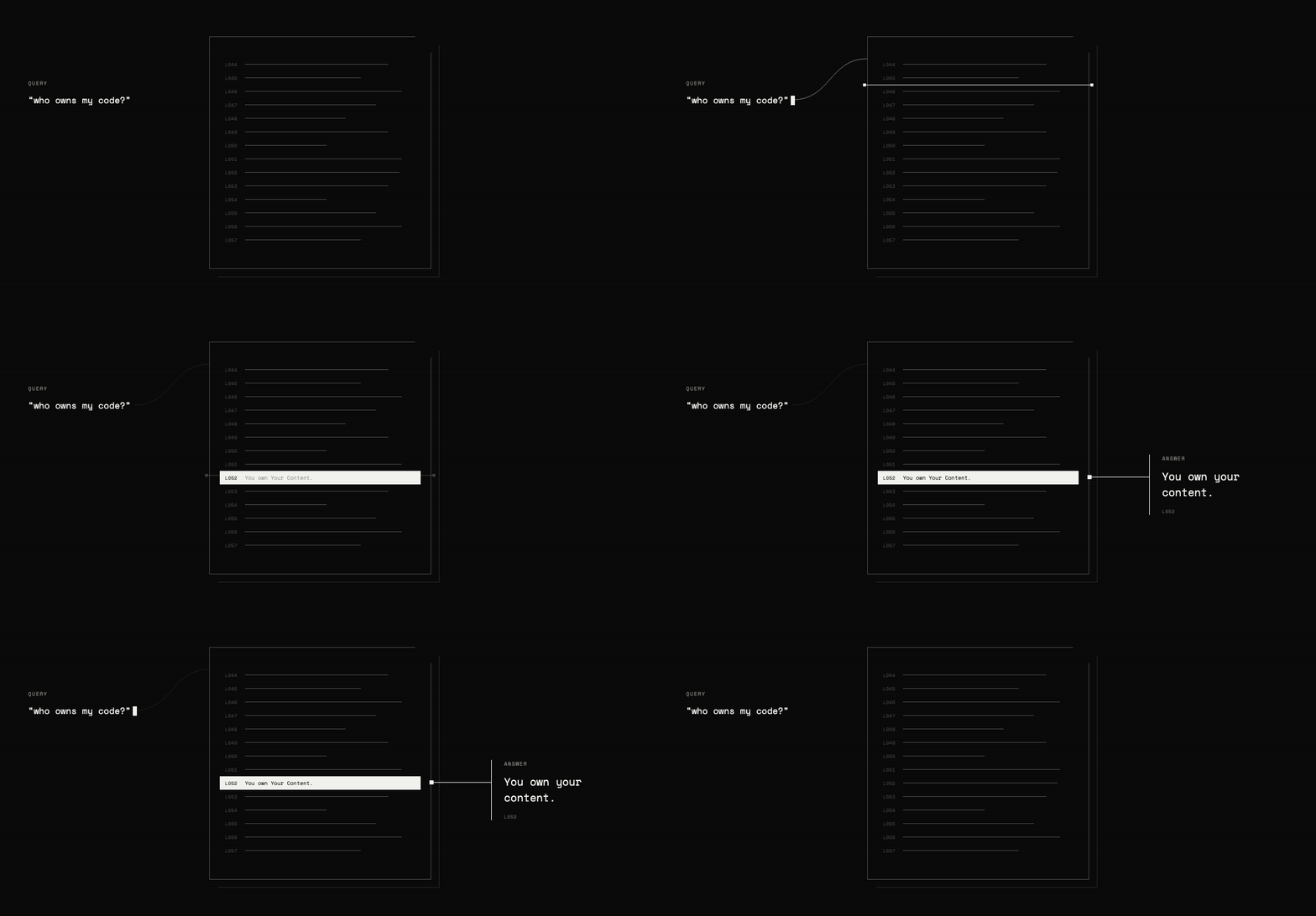
検索バックエンドは3つの部分で構成されます:
- TypeSafeが各行を指し示せるよう、各行にIDを付与する。
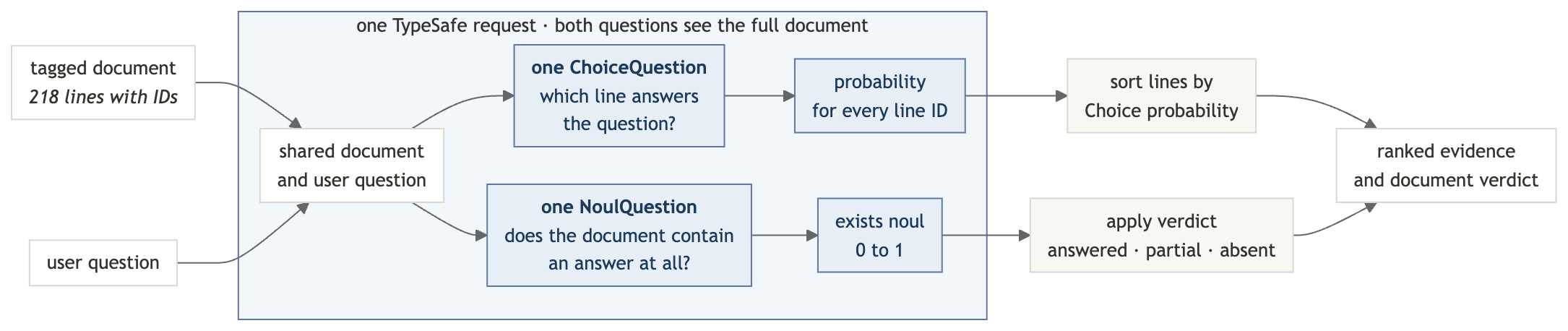
Choiceの質問を用いて、それらの行IDがクエリにどれだけ適切に回答しているかによって順位付けする。Choice 質問の確率は常に1に合計されるため、クエリに回答する行がなくても、ある行が第1位となる。- 同じリクエスト内で、
Noulの質問を用いて、ドキュメントに回答が含まれているかどうかを確認する。
セットアップ
TypeSafe APIキーを取得する
TypeSafe コンソールでキーを作成し、エクスポートしてください:
export TYPESAFE_API_KEY="your-key-here"依存関係をインストールする
pip install "typesafe-sdk>=0.5.7" cooksafe \
  --extra-index-url https://pypi.typesafe.ai/
JsonCache は含まれるAPIレスポンスを再生するため、以下の手順はAPIキーや課金なしで実行されます。リクエストを実際に送信するには、TYPESAFE_API_KEY を設定し、json_cache.json を削除してください。
スクリプトを作成する
semantic_search.py のインポートとクライアントから開始します:
import os
import urllib.request
from pathlib import Path

from cooksafe import JsonCache
from typesafe_sdk import Choice, Noul, NoulCriteria, TypeSafeClient

TYPESAFE_MODEL = "jev-1.12"

client = TypeSafeClient(
    api_key=os.environ.get("TYPESAFE_API_KEY", "cache-only"), timeout=120.0
)
json_cache = JsonCache(Path("json_cache.json"))
ステップ1: 各行にIDを付与する
テスト文書はGitHubの利用規約であり、218条項に分割されているため、すべての検索結果は引用可能な1行を指し示します。
semantic_search.pyに追加:
GIST = (
    "https://gist.githubusercontent.com/eugene-shvarts/900632789a24983d5678ffd508dd01f6"
    "/raw/cf9c2ab422d568deade949ef0a06bed6896964b9/github-tos.txt"
)


@json_cache
def fetch_document(url: str) -> str:
    request = urllib.request.Request(
        url, headers={"User-Agent": "typesafe-cookbook/1.0"}
    )
    with urllib.request.urlopen(request) as response:
        return response.read().decode()


LINES = fetch_document(GIST).splitlines()キャッシュにより重複したダウンロードが防止され、splitlines()には218個の文字列のリストが残されます。
各行の先頭に短い ID を付与し、行を結合して1つのドキュメントに戻します。モデルはこれらの ID を使用して自身の回答を参照します。
def line_id(i: int) -> str:
    return f"L{i:03d}"


DOCUMENT = "\n".join(f"{line_id(i)}| {line}" for i, line in enumerate(LINES))
DOCUMENT は今、このようになっています:
L052| You own Your Content. If you post Content you did not create, you are responsible for...
L053| You grant us and other Users the licenses in Sections D.4–D.8. These licenses apply...
L054| 4. License Grant to Us
ステップ2: 答えがどこにあるか尋ねる
Choiceの質問は、各選択肢に対して確率を返します。行IDを選択肢として使用し、「選択肢を選ぶ」は「行を指す」になります。
def where_question(query: str) -> Choice:
    return Choice(
        instructions=f'Which line of the document contains the answer to: "{query}"?',
        criteria={line_id(i): None for i in range(len(LINES))},
)オプションの説明はNoneです。各IDに対応するテキストはすでに文書に含まれているためです。クエリはinstructionsに入力されます。検索間中は状態は変更されません。
注 —
Choice質問は最大255個の選択肢を受け付けるため、このレシピは1回のリクエストで最大255行のドキュメントを検索します。それを超える場合は、2回のパスで検索します。1回目の Choice 質問で行のウィンドウを選択し、2回目でそのウィンドウ内の行をランク付けします。
ステップ3:回答が存在するか確認する
Choiceの確率は常に合計で1になるため、文書が質問に答えていない場合でも、ある行が常に1位になります。ランキングだけでは、実際の回答と最も関連性の低い行を見分けることができません。
なので、同じリクエストの中で2つ目の質問を投げかけてください:
def exists_question(query: str) -> Noul:
    return Noul(
        instructions=f'Does any line of the document address or answer: "{query}"?',
        criteria=NoulCriteria(
            true="At least one line of the document states or directly implies the answer",
            false="No line of the document addresses this",
        ),
    )
Choiceの確率とは異なり、Noulの確率は他の選択肢に依存しないため、 ドキュメントに回答がない場合、ほぼゼロに近づく可能性がある。
ステップ4: 両方の質問を1つのリクエストで送信
system_oneメソッドは、両方の質問を一度の処理で回答します。状態は1回だけ送信されるため、存在チェックの追加にはわずかな追加出力のみが必要です。
@json_cache
def _find(
    model: str,
    state: str,
    where: Choice,
    exists: Noul,
) -> dict:
    response = client.system_one(
        state=state,
        questions={"where": where, "exists": exists},
        model=model,
    )
    probabilities = response.answers["where"].probabilities
    return {
        "exists": response.answers["exists"].noul,
        "relevance": [probabilities.get(line_id(i), 0.0) for i in range(len(LINES))],
    }


def find(query: str) -> dict:
    return _find(
        TYPESAFE_MODEL,
        DOCUMENT,
        where_question(query),
        exists_question(query),
    )
The relevance listは、1行に1つのスコアを、文書順に保持します。
ステップ5: 結果を読む
ローカルコード2つで完了です:verdict()は生のexists確率を3つの状態に変換し(部分的な回答用の中間状態を含む)、show()はrelevanceを棒グラフとしてレンダリングし、ターミナルでランキングが読み取り可能になります。
FOUND, ABSENT = 0.7, 0.35  # present answers typically read >=0.9, absent <=0.05


def verdict(exists: float) -> str:
    if exists >= FOUND:
        return "answered in this document"
    return "not in this document" if exists < ABSENT else "partially addressed"


def show(query: str, top: int = 4) -> dict:
    result = find(query)
    print(f'"{query}"')
    print(f"  exists {result['exists']:.2f} -> {verdict(result['exists'])}")
    ranked = sorted(
        range(len(LINES)), key=lambda i: result["relevance"][i], reverse=True
    )
    for i in ranked[:top]:
        bar = "#" * max(1, round(result["relevance"][i] * 12))
        preview = LINES[i][:58].rstrip()
        print(f"  {line_id(i)}  {result['relevance'][i]:.2f}  {bar:<12}  {preview}")
    return result
これらの閾値は以下の例を区切りますが、本番環境で使用する前に、ご自身のドキュメントに対して調整してください。
ステップ 6: 検索を実行
直接な答えがある質問を2つ、答えがない質問を1つ、部分的な答えがある質問を1つ、合計4つ問いかけてください。
print(f"{len(LINES)} lines, {len(DOCUMENT):,} characters\n")
show("who owns the code I upload?")
print()
show("can GitHub kick me off the platform without warning?")
print()
show("do I have to take disputes to arbitration?", top=2)
print()
show("can minors use GitHub with parental permission?", top=2)
218 lines, 43,980 characters
"who owns the code I upload?"
exists 0.98 -> answered in this document
L052 0.95 ########### You own Your Content. If you post Content you did not crea
L046 0.02 # Short version: You own content you create, but you allow u
L051 0.02 # 3. Ownership and License Grants
L217 0.01 # Questions about the Terms of Service? Contact us through t
"can GitHub kick me off the platform without warning?"
exists 0.97 -> answered in this document
L168 0.97 ############ GitHub has the right to suspend or terminate your access t
L167 0.03 # 3. GitHub May Terminate
L000 0.00 # Effective date: April 27, 2026 · A. Definitions
L001 0.00 # Short version: We use these basic terms throughout the agr
"do I have to take disputes to arbitration?"
exists 0.14 -> not in this document
L205 0.86 ########## Except to the extent applicable law provides otherwise, th
L168 0.02 # GitHub has the right to suspend or terminate your access t
"can minors use GitHub with parental permission?"
exists 0.46 -> partially addressed
L029 0.90 ########### You must be age 13 or older. While we are thrilled to see
L012 0.07 # “User,” “You,” and “Your” refer to the individual person,スコアの意味
最初の2つのクエリは、それらを検証するために必要なソース行とともに、直接的な回答を返します。
他の2つは、存在チェックがなぜ重要なのかを示しています:
- 仲裁: ランキングは最も近い行に 0.86 のスコアを与えますが、
existsは 0.14 に過ぎません。回答は文書内にありません。 - 保護者の許可: 年齢制限ルールが最上位にランクされていますが、保護者の許可がルールを変更するかどうかについては回答していません。結果は部分的に扱われています。
ランキングはどこを見るべきかを示し、existsスコアは結果が質問に答えているかどうかを示します。
独自のドキュメントで試す
TypeSafeプレイグラウンドでタグ付きコントラクトを開くして、同じテキストに対して質問を編集してください。自分自身のものを検索するには、fetch_document()のURLを置き換えてください。スクリプトの他のすべての行はLINESに基づいて動作します。