 JevCode
Funktionsaufruf
Verwandelt natürliche Handelsanfragen in Aufrufe gewöhnlicher typisierter Funktionen, indem Funktionsnamen und geschlossene Argumentmengen auf konfidenzbewusste TypeSafe-Fragen abgebildet werden.
Maschinell aus en übersetzt, nicht lektoriert. Nur als Kurzreferenz geeignet.

Wenn du einen „großen eisigen Haferlatte, ohne Süßungsmittel“ bestellst, schreibt die Barista deinen Satz nicht auf. Sie kreuzt vier Optionen auf einem Becher an. Dieses Kochbuch macht dasselbe für eine Trading-API: Ein Satz geht hinein, und heraus kommen ein Funktionsname sowie seine Argumente als ausgewertete Enums, jeweils mit einem Konfidenzwert.
"plot rolling correlation between nvda and spy for the past month"
    rolling_correlation(symbol='NVDA', benchmark='SPY', window='1mo')   confidence 0.91

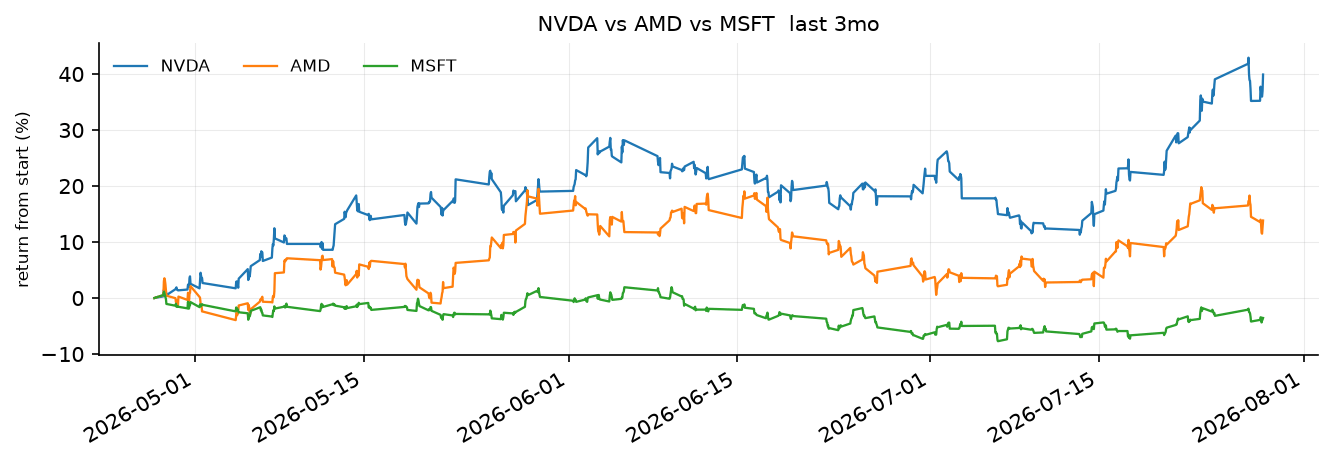
"compare nvda amd and msft over the past three months"
    compare_returns(symbols=['NVDA', 'AMD', 'MSFT'], window='3mo')      confidence 0.94

"show me apple daily with volume"
    plot_price(symbol='AAPL', resolution='1d', include_volume=True)     confidence 0.75

"what tickers do you have"
    list_symbols()                                                     confidence 1.00
Diese Aufrufe gehen an zehn gewöhnliche Funktionen in einem Trading-Assistenten. Ihre Argumente nehmen Werte aus festen Listen an, sodass sie bereits Literals sind:
def plot_price(
    symbol: Literal["SPY", "NVDA", "AMD", "AAPL", "MSFT", "TSLA"],
    style: Literal["line", "candles"] = "line",
    resolution: Literal["1m", "5m", "15m", "1h", "1d"] = "15m",
    window: Literal["1d", "1w", "1mo", "3mo"] = "1w",
    include_volume: bool = False,
    moving_average: Literal["9", "20", "50"] | None = None,
    log_scale: bool = False,
): ...
Ein Argument, dessen Werte aus einer festen Liste stammen, ist eine geschlossene Menge. Wenn es einen Wert aus dieser Liste annimmt, stellt es eine Choice-Frage über genau diese Werte, sodass das, was die Funktion erreicht, ein Wert ist, den die Funktion akzeptiert. Du lässt die Funktionen in Ruhe. Was du hinzufügst, ist eine Spezifikation, die in klaren Worten beschreibt, was jedes Argument bedeutet. Am Ende hast du eine Dispatcher, auf die du bei deinen eigenen Funktionen zeigen kannst.
Einrichtung
pip install ipython polars matplotlib numpy "typesafe-sdk>=0.5.7" cooksafe --extra-index-url https://pypi.typesafe.ai/Set TYPESAFE_API_KEY. Zwei Module befinden sich neben dieser Datei. trader.py enthält die zehn
Funktionen sowie einen TypeSafe-Client, der Antworten aus einem Cache liest, sodass das erneute Rendern die
unteren Zahlen abspielt, ohne die API aufzurufen. dispatch.py enthält den Code, der eine
Signatur und ein Spezifikationsdokument liest und den Aufruf durchführt.
import json
from pathlib import Path

from cooksafe import make_playground_link
from dispatch import ROUTE, Dispatcher, closed_sets
from IPython.display import Markdown, display
from trader import TOOLS, client, load

TYPESAFE_MODEL = "jev-1.12"
print(f"{len(TOOLS)} functions over {load().height:,} one-minute bars")
10 functions over 156,780 one-minute barsFinde die abgeschlossenen Mengen in den Signaturen
Die Typangaben zeigen bereits, welche Argumente aus einer festen Liste stammen und was sich in jeder Liste befindet. closed_sets liest eine Signatur und ordnet diese Argumente in drei Formen ein: eine choice (ein Literal, also ein Wert aus der Liste), eine set (ein list[Literal[...]], also beliebig viele davon) oder ein flag (ein bool, also an oder aus). Alle zehn Funktionen sind in trader.py definiert.
for name, fn in TOOLS.items():
    shapes = closed_sets(fn)
    print(
        f"  {name:<20}{len(shapes)}  "
        + ", ".join(f"{a}:{s}" for a, (s, _) in shapes.items())
    )
print(
    f"\n{sum(len(closed_sets(fn)) for fn in TOOLS.values())} fillable arguments in total"
)
list_symbols 0
market_summary 1 window:choice
plot_price 7 symbol:choice, style:choice, resolution:choice, window:choice, include_volume:flag, moving_average:choice, log_scale:flag
intraday_pattern 3 symbol:choice, window:choice, metric:choice
compare_returns 3 symbols:set, window:choice, normalize:flag
rolling_correlation 4 symbol:choice, benchmark:choice, window:choice, resolution:choice
summary_stats 2 symbol:choice, window:choice
volatility 3 symbol:choice, window:choice, annualized:flag
top_movers 2 window:choice, direction:choice
drawdown 3 symbol:choice, window:choice, plot:flag
28 fillable arguments in totaltop_movers zeigt, was ausgelassen wird. Von seinen drei Argumenten sind zwei geschlossene Mengen. Das dritte, limit, ist ein int, daher wird es niemals nach einer Frage gefragt und behält seinen Standardwert von 3. Freitext, Zahlen und Daten funktionieren auf die gleiche Weise: keine Frage, und der Standardwert der Funktion gilt.
Schreibe die Spezifikation
Die Literal liefert Ihnen die Strings "1mo" und "3mo". Sie besagt nicht, dass ein Benutzer, der „dieses Quartal“ eingibt, damit das zweite meint. Das ist die Spezifikation, die das festlegt. Sie enthält eine Frage pro Argument, eine Zeile pro Option, eine Beschreibung pro Funktion und eine weitere Frage, die zwischen den Funktionen auswählt. Sie befindet sich in spec.json, und eine LLM kann sie für Sie aus den Signaturen erstellen.
SPEC = json.loads(Path("spec.json").read_text())
for argument in ("style", "moving_average"):
    print(
        json.dumps(
            {argument: SPEC["functions"]["plot_price"]["arguments"][argument]}, indent=2
        )
    )
{
"style": {
"question": "Does the user want a plain line or candles?",
"stated": "Does the user say how the chart should be drawn, such as a line, candles, or OHLC bars?",
"options": {
"line": "a simple line through the closing prices",
"candles": "a candlestick or OHLC chart, showing each bar's open, high, low and close"
}
}
}
{
"moving_average": {
"question": "How many bars should the moving average cover - nine, twenty, or fifty?",
"stated": "Does the user ask for a moving average or a smoothed line over the candles?",
"options": {
"9": "a nine-bar moving average, a fast one",
"20": "a twenty-bar moving average",
"50": "a fifty-bar moving average, a slow one"
}
}
}Die Optionsschlüssel sind die Zeichenfolgen, die die Funktion entgegennimmt, sodass nichts mehr ein Label auf ein Argument zurückmappen muss. stated macht ein Argument optional. Es ist eine zweite Ja/Nein-Frage, die prüft, ob der Befehl überhaupt etwas zu diesem Argument aussagt. Wenn die Antwort nein lautet, lässt der Aufruf dieses Argument weg und die eigene Vorgabe der Funktion gilt.
Eine Set-Argumentierung stellt jedem Mitglied einmal eine Frage, wobei {} für den Mitgliedernamen steht. "Does the user want {} in the comparison?" wird zu einer Frage pro Ticker.
Schreibe jede Frage zur Idee, nicht zu den Worten, die ein Nutzer wählen könnte, da der Match auf der Bedeutung basiert: „is amd tracking nvidia lately“ trifft rolling_correlation, obwohl weder tracking noch lately irgendwo in spec.json vorkommt. Benenne eine Frage nicht nach ihrem Parameter – "Which resolution?" gibt dem Befehl nichts, woran er anknüpfen kann.
Verwandele die Spezifikation in Fragen
Dispatcher erstellt die Fragen aus der Spezifikation einmal. Jeder Befehl ist dann eine Anfrage, die die Wahl der Funktion und die Argumente jeder Funktion trägt, und der Dispatcher liest nur die Antworten der gewählten Funktion.
assistant = Dispatcher(SPEC, TOOLS, client)
print(f"{len(assistant.questions)} questions per command, among them:")
for qid in (
    "__tool__",
    "plot_price.style",
    "plot_price.style?",
    "compare_returns.symbols.NVDA",
):
    question = assistant.questions[qid]
    print(f"  {qid:<30}{question['type']:<8}{str(question['instructions'])[:64]}")
54 questions per command, among them:
__tool__ choice What is the user asking the trading assistant to do?
plot_price.style choice Does the user want a plain line or candles?
plot_price.style? noul Does the user say how the chart should be drawn, such as a line,
compare_returns.symbols.NVDA noul Does the user want NVDA in the comparison?Führen Sie vierzehn Befehle aus
Eine Anfrage belegt eine Zeile, und ihr confidence ist die unsicherste Einschätzung hinter diesem Aufruf.
COMMANDS = [
    "show nvda 1h",
    "plot rolling correlation between nvda and spy for the past month",
    "when during the day does nvda trade the most",
    "what moved today",
    "what tickers do you have",
    "how did the market do this week",
    "candles for tesla with a 20 period moving average",
    "compare nvda amd and msft over the past three months",
    "how volatile is tsla",
    "biggest losers today",
    "worst drawdown for nvda this quarter, and chart it please",
    "spy stats for the last month",
    "show me apple daily with volume",
    "is amd tracking nvidia lately",
]

CALLS = {command: assistant(command) for command in COMMANDS}
for command, call in CALLS.items():
    print(f'  "{command}"')
    print(
        f"      {str(call):<66}confidence {call.confidence:.2f}"
        f"   tool {call.tool.probability:.2f}"
    )
"show nvda 1h"
plot_price(symbol='NVDA', resolution='1h') confidence 0.78 tool 1.00
"plot rolling correlation between nvda and spy for the past month"
rolling_correlation(symbol='NVDA', benchmark='SPY', window='1mo') confidence 0.91 tool 1.00
"when during the day does nvda trade the most"
intraday_pattern(symbol='NVDA') confidence 0.53 tool 1.00
"what moved today"
top_movers(window='1d', direction='gainers') confidence 0.90 tool 0.90
"what tickers do you have"
list_symbols() confidence 1.00 tool 1.00
"how did the market do this week"
market_summary(window='1w') confidence 0.96 tool 0.99
"candles for tesla with a 20 period moving average"
plot_price(symbol='TSLA', style='candles', moving_average='20') confidence 0.69 tool 0.97
"compare nvda amd and msft over the past three months"
compare_returns(symbols=['NVDA', 'AMD', 'MSFT'], window='3mo') confidence 0.94 tool 1.00
"how volatile is tsla"
volatility(symbol='TSLA') confidence 0.96 tool 1.00
"biggest losers today"
top_movers(window='1d', direction='losers') confidence 0.98 tool 0.98
"worst drawdown for nvda this quarter, and chart it please"
drawdown(symbol='NVDA', window='3mo', plot=True) confidence 0.84 tool 0.84
"spy stats for the last month"
summary_stats(symbol='SPY', window='1mo') confidence 0.88 tool 0.88
"show me apple daily with volume"
plot_price(symbol='AAPL', resolution='1d', include_volume=True) confidence 0.75 tool 0.85
"is amd tracking nvidia lately"
rolling_correlation(symbol='AMD', benchmark='NVDA') confidence 0.82 tool 0.82Beide langen Befehle kamen genau wie angefordert heraus. „plot rolling correlation between nvda and spy for the past month“ füllte vier Argumente aus einem einzigen Satz. Zwei davon, symbol und benchmark, stammen aus denselben sechs Tickers, und jeder Ticker landete im richtigen Argument, weil die Fragen die Rollen klar benennen: der erste genannte, der gemessen wird, gegen der zweite genannte, der als Maßstab dient. „compare nvda amd and msft over the past three months“ platzierte drei Tickers in der Menge und ließ die anderen drei außen vor.
Drei davon ausführen:
for command in (
    "plot rolling correlation between nvda and spy for the past month",
    "compare nvda amd and msft over the past three months",
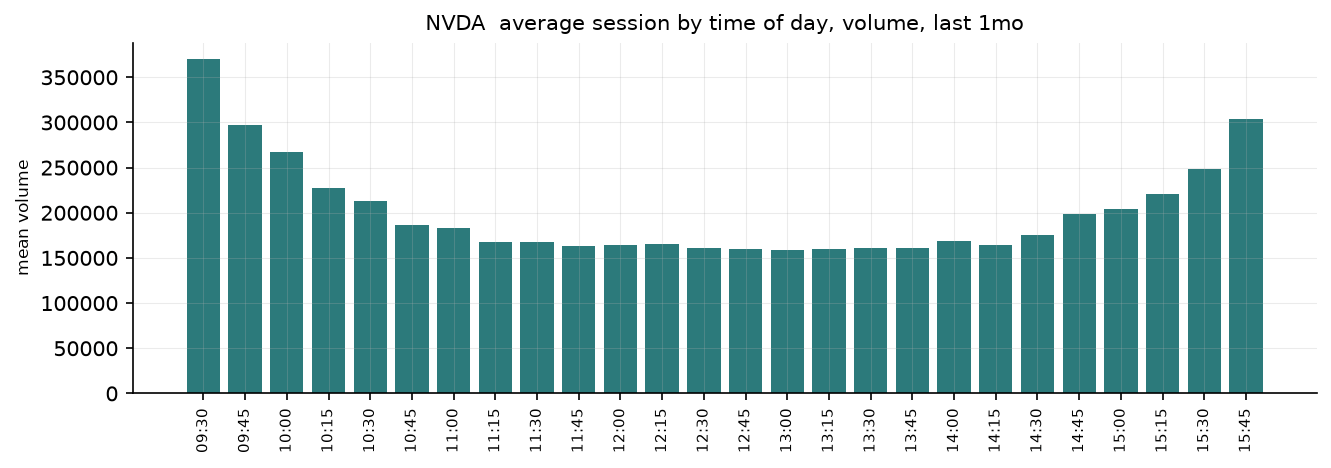
    "when during the day does nvda trade the most",
):
    print(f'"{command}"  ->  {CALLS[command]}')
    display(CALLS[command].run())
"plot rolling correlation between nvda and spy for the past month" -> rolling_correlation(symbol='NVDA', benchmark='SPY', window='1mo')
"compare nvda amd and msft over the past three months" -> compare_returns(symbols=['NVDA', 'AMD', 'MSFT'], window='3mo')
"when during the day does nvda trade the most" -> intraday_pattern(symbol='NVDA')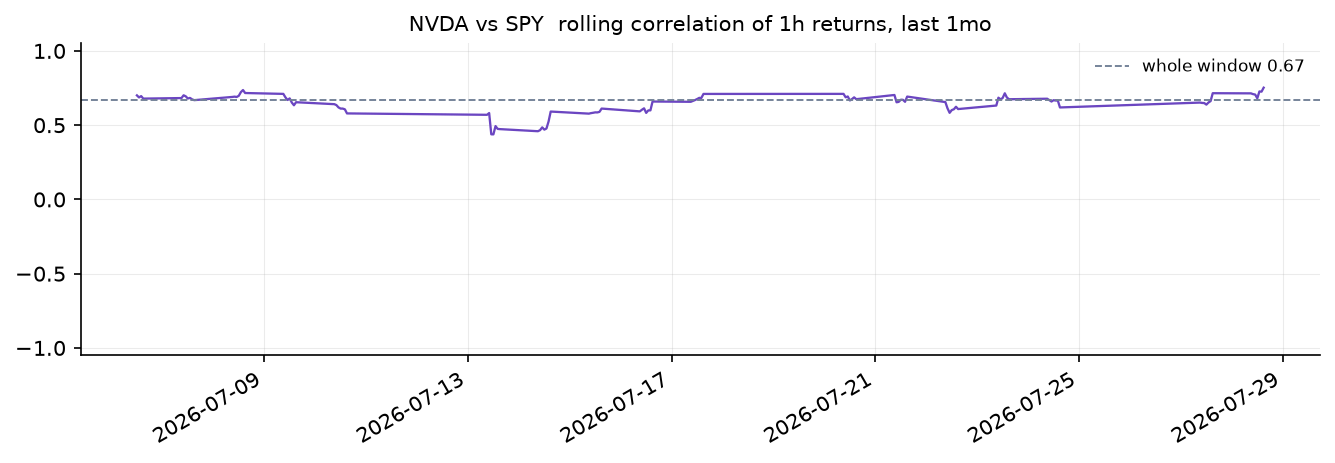
Und diejenigen, die in Textform antworten:
for command in ("how did the market do this week", "biggest losers today"):
    print(f'"{command}"  ->  {CALLS[command]}')
    print(CALLS[command].run(), "\n")
"how did the market do this week" -> market_summary(window='1w')
the board over 1w
NVDA 254.12 9.62% 389,465,563
AMD 184.20 1.51% 182,740,497
AAPL 258.71 0.97% 223,818,998
SPY 664.86 0.40% 138,617,365
MSFT 451.35 0.26% 113,427,173
TSLA 320.22 -0.97% 266,317,023
"biggest losers today" -> top_movers(window='1d', direction='losers')
top 3 losers over 1d
AMD -0.57% -> 184.20
MSFT 0.67% -> 451.35
AAPL 1.40% -> 258.71 Lies das Vertrauen
confidence meldet das unsicherste Urteil im Aufruf, nicht das Produkt aus allen, da ein falsches Argument ausreicht, um das Ergebnis zu verderben. Ein Produkt beantwortet eine andere Frage („ist jeder Teil richtig“) und sinkt, wenn eine Funktion mehr Argumente annimmt, unabhängig davon, ob ein einzelnes Urteil wackelig ist.
Woher diese Zahl stammt, Argument für Argument:
call = CALLS["is amd tracking nvidia lately"]
print(f'"is amd tracking nvidia lately"  ->  {call}   confidence {call.confidence:.2f}')
for name, argument in call.arguments.items():
    top = sorted(argument.distribution.items(), key=lambda kv: -kv[1])[:3]
    shown = "omitted, default stands" if argument.omitted else repr(argument.value)
    print(
        f"  {name:<12}{shown:<26}p {argument.probability:.2f}   "
        + "  ".join(f"{k} {v:.2f}" for k, v in top)
    )
print(f"  weakest argument: {call.weakest().name}")
"is amd tracking nvidia lately" -> rolling_correlation(symbol='AMD', benchmark='NVDA') confidence 0.82
symbol 'AMD' p 0.87 AMD 0.87 NVDA 0.13 AAPL 0.00
benchmark 'NVDA' p 0.78 NVDA 0.92 AMD 0.08 AAPL 0.00
window omitted, default stands p 0.96
resolution omitted, default stands p 0.99
weakest argument: benchmarkwindow und resolution werden hier beide weggelassen, da „in letzter Zeit“ nicht angibt, wie weit zurück
oder auf welchen Balken, sodass rolling_correlation seine Standardwerte von einem Monat und stündlichen
Balken verwendet. Dafür ist die stated-Frage gedacht. Ohne sie müsste die Wahl
ein bestimmtes Fenster benennen, und sie hätte eines mit Sicherheit benannt.
Öffnen Sie es im Playground
Der untenstehende Link enthält einen Befehl sowie die Fragen für die Funktion, die er ausgewählt hat: die Auswahl aus den zehn Funktionsbeschreibungen und die vier Argumente von rolling_correlation. Bearbeiten Sie den Befehl dort, und die Argumente ändern sich entsprechend.
COMMAND = "plot rolling correlation between nvda and spy for the past month"
picked = CALLS[COMMAND]
playground_link = make_playground_link(
    COMMAND,
    {ROUTE: assistant.questions[ROUTE]}
    | {q: v for q, v in assistant.questions.items() if q.startswith(f"{picked.name}.")},
    models=[TYPESAFE_MODEL],
)
display(
    Markdown(
        f"🔗 [Open the command and its questions in the TypeSafe playground]({playground_link})"
    )
)